If you’ve ever walked a production floor where textile or custom graphic goods roll off lines, you know automatic screen printing presses are the unsung heroes of consistent, high-volume output. As someone who’s spent 18 years selling, servicing, and troubleshooting these machines, I’ve sat across from dozens of buyers who assumed “automatic” would eliminate every headache of screen printing—only to walk away frustrated because their press broke down mid-batch, printed off-registration, or ate through ink and screens faster than expected. Not every problem is a flaw in the machine itself; many stem from misoperation, poor maintenance, or gaps in understanding how these systems work. Today, I’m breaking down the most common issues I see, what causes them, and how to avoid them—straight from the field, no marketing fluff, just honest advice for anyone who relies on automatic screen printing presses. Automatic Screen Printing Press
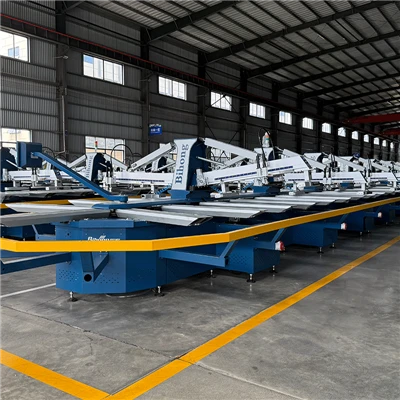
First, let’s start with registration errors—this is the number one complaint I hear, and it’s not always about a faulty press. Registration, basically, is making sure each color lines up perfectly so your design doesn’t look like it’s shifted sideways or up and down. A lot of new operators assume the automatic press’s built-in alignment system will fix every tiny mistake, but that’s not true. I once worked with a small apparel shop owner who bought a mid-range automatic press, ran a batch of hoodies, and found the red logo was off by a quarter of an inch on half the run. Turns out, she’d loaded the fabric manually onto the pallets, and the pallets themselves had a tiny, unnoticeable warp from years of use on an old manual press. The automatic press’s registration sensors only adjust for movement after the fabric is loaded, so if the pallet is warped, the sensor can’t compensate for that initial variation. Another common registration issue is dirty or misaligned eye sensors—many presses use optical sensors to lock in color, so a speck of dried ink on a sensor lens will trick the system into thinking it’s out of line, leading to a cascading alignment error across the entire run. Even something as simple as loose screen clamps can cause this: if a screen isn’t secured tightly to the press’s bar, it will shift slightly every time the press cycles, and that shift adds up fast over 1,000 pieces.
Next, inconsistent ink laydown. Automatic presses are designed to deposit a precise amount of ink per color, but I’ve seen press operators run through a set of screens and notice some colors are too thin (fading after a few washes) and others are caked on so thick they crack. The culprit here is usually either worn squeegees or incorrect press speed. Squeegees are the rubber blades that push ink through the screen; over time, they wear down into a rounded edge instead of a sharp, angled one. A rounded edge doesn’t apply enough pressure to push a consistent amount of ink through the mesh, so you get thin, patchy prints. I once had a customer who ignored squegee replacement for six months, and he ended up wasting 200 yards of fabric because every other print was too faint. Press speed is another big factor: when the press runs too fast, the ink doesn’t have time to level out and dry before the next layer is applied, so it sits unevenly. If it runs too slow, the ink can dry on the screen before it’s pushed through, leading to clogs. I always tell customers to test press speed with a scrap fabric first, not the production run—even a 10 RPM difference can change ink laydown entirely.
Then there are screen clogs and premature screen wear. Automatic presses are high-volume, so they run for 12+ hours a day in many shops, which puts a lot of stress on the screens. The most common clog issue is dried ink left on the screen after a run. A lot of operators will do a quick rinse after a batch, but if they don’t scrub the mesh with a degreaser immediately, ink will dry and harden in the mesh openings. That not only ruins the screen but also means you have to push harder on the next run, which wears the screen’s emulsion faster. Another issue is using the wrong type of ink for the screen or fabric. Plastisol ink, for example, is thick and requires a sturdier mesh count than water-based ink. If you use a low-mesh screen for plastisol, the pressure from the press will stretch the mesh over time, making it sag. Sagged mesh means the screen doesn’t sit flat against the fabric, so ink seeps under the edges, leading to blurry prints. I’ve seen shops go through a screen a week because they didn’t adjust mesh count for their ink type—easy fix, but one that’s often overlooked.
Electrical and mechanical breakdowns that bring production to a halt. Automatic presses have a lot of moving parts: cams, belts, gears, sensors, and motors. The most preventable breakdown I see is lack of regular maintenance. I once visited a shop that hadn’t changed the press’s drive belt in three years, and the belt snapped mid-production on a 5,000-piece order of custom team jerseys. They lost thousands in rush fees and spoiled inventory because they skipped a $50 part and a 15-minute maintenance task. Another electrical issue is water damage from improper cleaning. Many operators spray down the press after a run to clean off ink, but if they get water into the control panel or motor housing, it causes short circuits that lead to costly repairs. I always warn customers: never spray a water directly on electrical components—use a damp cloth for the frame, and cover motors and panels with plastic when cleaning. Sensors, too, are a common weak point. Optical registration sensors can get knocked out of alignment if a screen vibrates too hard, or if a piece of lint or ink builds up on the lens. One customer even accidentally spilled a cup of coffee on his press’s sensor during a long shift, and the system stopped working for two days while a technician replaced the part.
Beyond these operational issues, there’s the gap between a press’s advertised capabilities and real-world use. A lot of buyers look for a “high-speed” press without considering their production needs. For example, if you’re printing small, 2-color designs on small pallets, a high-speed 10-station press might not be the best fit—you’re paying for speed you don’t need, and the smaller parts wear out faster from constant cycling. I once had a customer who bought a 16-station high-speed press to print 2-color logo t-shirts for local small businesses, and he ended up with constant registration errors because the press was optimized for large, high-volume runs of multi-color designs. That’s a mismatch between machine capability and use case, not a flaw in the press itself. I see this all the time: buyers get swayed by specs instead of talking through their actual production volume, design size, and fabric types with someone who knows the equipment.
So, what does all this mean for you? The good news is that almost all of these common problems are avoidable with basic maintenance, proper training, and a press that’s matched to your actual needs. If you’re in the market for an automatic screen printing press, don’t just go by the sales brochure—ask questions about common wear parts, recommended maintenance schedules, and how the press handles small-batch runs (if that’s what you do). Many suppliers will throw in free training sessions or a maintenance guide to help you get the most out of your machine, and that’s worth every penny.
At the end of the day, an automatic screen printing press is only as good as the people running it and maintaining it. I’ve seen budget presses run perfectly for five years because the shop owner does weekly checks, replaces squeegees every two months, and cleans sensors after every run. I’ve also seen top-of-the-line presses fall apart in a year because of skipped maintenance and untrained operators. If you’re dealing with consistent issues with your current press, or you’re in the market for a new one, taking the time to understand these common problems and how to avoid them will save you thousands in waste, downtime, and repairs.
If you’re looking to invest in an automatic screen printing press that’s built for your specific production needs, or you’re tired of troubleshooting consistent issues with your current equipment, reach out to discuss your requirements. We don’t push one-size-fits-all machines—we work with you to find the right fit, and back it up with service and support to keep your line running smoothly.
Embroidery Digital Printer References
- Textile Screen Printing Association. (2022). Best Practices for Automatic Screen Press Operation and Maintenance.
- Industrial Equipment Manufacturers Association. (2021). Common Failure Points in Automatic Printing Systems.
- Journal of Printing Technology and Engineering. (2020). The Impact of Press Speed on Ink Laydown Quality in High-Volume Screen Printing.
Guangdong Aces Machinery Co., Ltd.
Guangdong Aces Machinery Co., Ltd. is one of the most professional automatic screen printing press manufacturers and suppliers in China. We are committed to providing high quality equipment made in China with low price. If you’re going to buy durable automatic screen printing press, welcome to get pricelist from our factory. Customized orders are welcome.
Address: 701, Building 5, Liandong U Valley, No.8 Zhixin 1st Road, Dagang Town, Nansha District, Guangzhou City, Guangdong Province, China.
E-mail: jessie@bhprinter.com
WebSite: https://www.bihongprinter.com/
